
Sympathetic String Simulation for iPhone & iPad
Overview
CuSnP is an Audio Unit Extension (AU) designed specifically for iPhone and iPad, developed by Neon Silicon LLC. It functions as a container for the AU and serves primarily as a documentation tool, enabling users to access and utilize the core audio processing capabilities within a compatible host environment. The software is not intended for standalone use and requires integration with an AU host or digital audio workstation (DAW) application to operate.
At its core, CuSnP specializes in sympathetic string simulation—a technique that mimics the natural resonance of strings when excited by external audio. When audio is fed into the system, the internal simulated strings respond and vibrate in harmony, producing rich, organic textures reminiscent of acoustic instruments like pianos or harps. This capability allows musicians and producers to add depth, spatial complexity, and emotional nuance to their compositions.
Target users include professional composers, sound designers, and mobile music enthusiasts who seek advanced audio manipulation tools on iOS devices. The software is particularly suited for those exploring ambient, cinematic, or experimental music genres where subtle harmonic overtones play a key role. Its intuitive interface and straightforward controls make it accessible to users across skill levels, supporting both creative experimentation and precise production workflows.
Key Features & Capabilities
- Audio Unit Extension (AU) Integration: Designed to function exclusively within compatible AU hosts or DAWs on iPhone and iPad, ensuring seamless integration into existing mobile music production setups.
- Real-Time Sympathetic String Simulation: Responds dynamically to incoming audio signals, generating resonant harmonics that mirror the behavior of physical strings in acoustic instruments.
- High-Fidelity Sound Modeling: Emulates the natural vibration patterns of strings, producing nuanced, organic textures ideal for ambient and cinematic soundscapes.
- Lightweight Design: With a file size of 45.5 MB, CuSnP is optimized for mobile performance, minimizing impact on device resources during active use.
- Documentation-First Interface: Acts as a guide for users to understand and configure the AU, providing clarity on parameters and usage within a host environment.
These features enable users to enhance their tracks with layered, responsive textures. For example, applying CuSnP to a vocal recording can generate a subtle, shimmering resonance that adds emotional weight. Similarly, using it with a melodic loop can create evolving harmonic backgrounds without additional instrumentation. The simulation’s sensitivity to input dynamics allows for expressive, context-aware results that adapt to the music in real time.
User Interface, Workflow & Performance
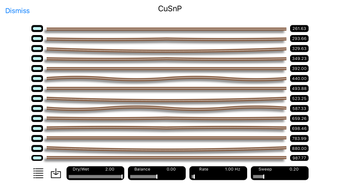
The user interface of CuSnP is designed with clarity and functionality in mind. As a documentation tool, it presents essential parameters and settings in a clean, organized layout that supports quick access and adjustment. Navigation is straightforward, relying on standard iOS touch controls, which ensures consistency with other mobile applications.
Workflow efficiency is optimized for integration within a DAW environment. Users are expected to load CuSnP as a plugin in a host application, where it processes audio in real time. The interface does not include playback controls or sequencing features, as these are managed by the host application. This design choice streamlines the user experience and maintains focus on the core simulation functionality.
Performance details were not specified by the developer. However, given its AU format and file size of 45.5 MB, CuSnP is expected to operate efficiently on modern iPhone and iPad devices. The developer did not provide additional system requirements, and resource usage such as CPU or RAM consumption remains unspecified. Stability is assumed to align with standard AU behavior on iOS, though real-world performance may vary based on the host application and device configuration.
Compatibility & System Requirements
CuSnP is compatible with iPhone and iPad devices running a supported version of iOS. The software is distributed as an Audio Unit Extension, meaning it must be used within a compatible AU host or DAW application. The developer did not specify exact system requirements, including minimum iOS version or hardware specifications.
Installation size is listed at 45.5 MB, which is relatively modest for a mobile audio plugin. This suggests efficient packaging and minimal storage overhead. Platform compatibility information is limited to the supported devices—iPhone and iPad—without further details on specific models or processor types.
Exact system requirements were not listed. Users should ensure their device supports AU extensions and has a compatible DAW app installed to use CuSnP effectively. The lack of detailed technical specifications means that performance and compatibility may depend on the host environment and device capabilities.
Pros and Cons
Pros
- Unique sympathetic string simulation for expressive audio textures
- Lightweight at 45.5 MB, suitable for mobile devices
- Designed for integration with professional AU hosts and DAWs
- Free to download and use, with no in-app purchases
- Intuitive interface suitable for users of all experience levels
Cons
- Requires a compatible AU host or DAW to function—cannot run standalone
- No standalone playback or recording features
- Limited documentation on system requirements and performance
- Only available on iPhone and iPad, no support for Mac or Windows
- Dependent on host application for full functionality
FAQ Section
Is CuSnP available for Mac or Windows?
CuSnP is designed exclusively for iPhone and iPad. It is not available for Mac or Windows operating systems.
Can I use CuSnP without a DAW or AU host?
No. CuSnP is an Audio Unit Extension and requires a compatible AU host or DAW application to function. It cannot be used as a standalone app.
Is CuSnP safe to download and install?
Yes, CuSnP is developed by Neon Silicon LLC and distributed through official app channels. It does not contain known malware or security risks.
Does CuSnP require an internet connection?
No. CuSnP operates offline once installed. No internet connection is needed for regular use.
How often are updates released for CuSnP?
The developer has not provided information on update frequency. Users should check the app store for the latest version.
Final Thoughts
CuSnP offers a unique and innovative approach to sound design through its sympathetic string simulation. While it functions as a plugin rather than a standalone tool, its integration into mobile DAWs opens new creative avenues for musicians and producers on iOS. The software’s lightweight footprint, free availability, and intuitive design make it an accessible entry point into advanced audio manipulation.
Its greatest strength lies in its ability to generate organic, responsive textures that enhance musical compositions with emotional depth. However, users must have a compatible AU host to unlock its full potential. For those already working within a mobile DAW ecosystem, CuSnP delivers a powerful, specialized tool that expands sonic possibilities.
Download CuSnP now.







